Lesson 5: Bevel and smooth
Two tools that make models look finished
- Bevel (in Edit Mode): rounds an edge into a small slope.
- Subdivision Surface (a modifier): smooths the whole model. Your original shape stays the same. Only the look changes.
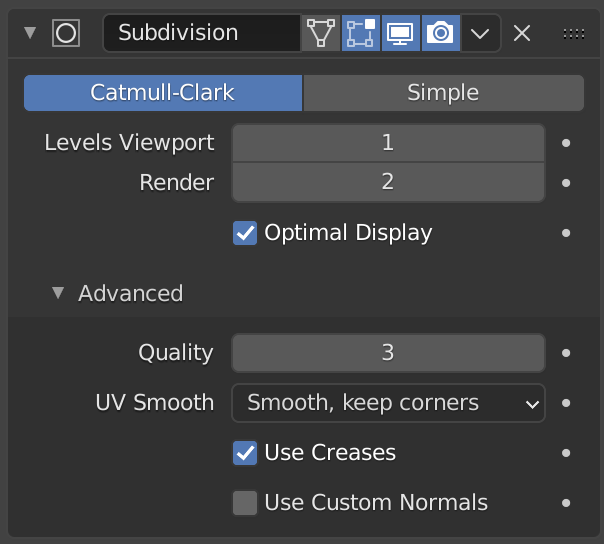
Image: Blender Manual by the Blender Documentation Team, licensed under CC BY-SA 4.0. Shared unchanged.
Modifier tab: select the object, then click the blue wrench icon in the left column of the Properties panel on the right. It sits directly below the orange Object icon, which you used in Lesson 2.
Steps
- Tool Select a cube and press Tab for Edit Mode.
- Key Press 2 for edge select.
- Mouse Click one edge. It turns orange.
- Key Press Ctrl + B. Move the mouse slightly and click. Ctrl+B unverified on Mac
- Check The edge now has a narrow slope instead of a sharp corner.
- Key Press Tab to return to Object Mode.
- Open the Modifier tab (wrench). Click Add Modifier, then Generate > Subdivision Surface. unverified menu names
- Key In the modifier, set Levels Viewport to 2.
- Check The cube looks soft and rounded, but the outline still matches the original shape.
- Key Save with Cmd + S.
Project: rounded coaster
A flat disc with rounded edges. Colors are your choice later.
- Tool Add a cylinder: Shift + A, then Mesh > Cylinder.
- In the Adjust Last Operation panel (bottom left), set Vertices to 32 and Radius to 1. panel name unverified
- Key Press S, Z, type 0.15, Enter. It becomes flat.
- Key Press Tab, then 2 for edge select.
- Key Press A to select all edges.
- Key Press Ctrl + B, move slightly, click to round the edges.
- Key Press Tab. Add a Subdivision Surface modifier and set Levels Viewport to 2.
- Key Save as
coaster.blendwith Cmd + S.